


Shop
4.4206.73K Reviews
App Specs
- Version
- 2.271.0
- Updated On
- License
- Free
- Downloads
- 50,000,000+
- Developer
- Shopify Inc.
- Categories
- Shopping
- Platform
- Android, iOS
Screenshots
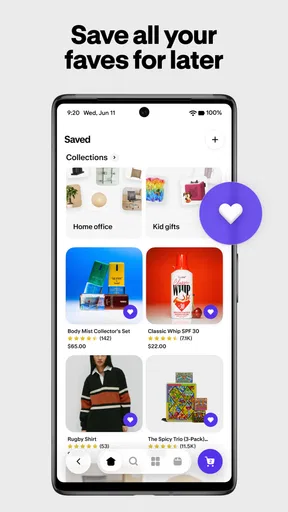
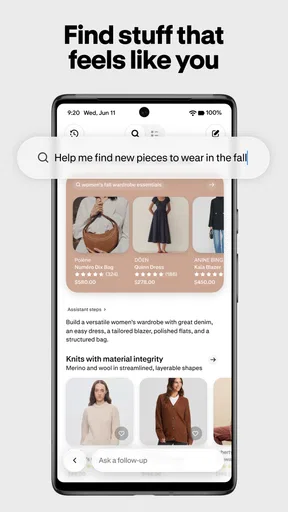
 Analysis by AppCompare
I like to decide what a shopping app is for before I let it become part of my routine. Shop: All your favorite brands is aimed at people who want one place to browse and keep tabs on purchases from different stores, rather than opening a separate app every time they shop. That can make everyday browsing feel more organized, but it does not mean every retailer or shopping task will work identically. I’d treat it as a convenient hub, then check the individual store’s details whenever a purchase depends on a particular delivery, return, or payment arrangement.
Where shoppers can get stuck
The first hurdle is often knowing what the app can simplify and what still belongs to the retailer. A central place to follow orders can save time, but order information is only useful when the relevant purchase is connected to the app. If you are looking for an order and cannot see it, start by checking that you are signed in to the account you used for the purchase and that the order is associated with that account. Searching old email confirmations can also help you identify which store handled the transaction.
Browsing can bring a different kind of friction. A recommendation may be interesting without being the best choice for your needs, and a product shown in a shopping app still deserves the same checks you would make elsewhere. Before buying, I would review the item description, seller and store information, delivery terms, and return conditions shown for that specific purchase. That small pause is especially worthwhile for gifts, time-sensitive orders, and products where size or compatibility matters.
Guides and Analysis on Shop
Shop Cash is another reason people may open the app, but I would not build a budget around a balance until I understand the terms displayed in the app. Treat it as a possible benefit rather than guaranteed savings on every order. Check the available balance and any conditions at checkout, and compare the final total with the price you would pay directly from the retailer. A discount is only useful if the item and overall cost already make sense.
Simple checks before you rely on it
Shop is a free shopping app from Shopify Inc., and its broad appeal is reflected in a 4.5 average from around 654,000 ratings. It has over 50 million installs, is rated for Everyone, and its current version is 2.234.0, with Android 8.0 as the minimum operating system. Those details make it easy to see why it attracts casual shoppers as well as people who buy online often, but a large audience does not remove the need to check whether your own device and account are ready.
When setting it up, I would begin with the basics: install the current app from your device’s official store, check that your operating system is supported, and sign in with the account you expect to use for shopping. If you have used different email addresses over time, keep that in mind before assuming an order has disappeared. A quick account check is often more useful than repeatedly refreshing the same screen.
It also helps to decide what you want from Shop before browsing. If your main goal is following purchases, focus on connecting the right account and keeping order confirmations easy to find. If you are there to discover products, take a moment to distinguish saved items from items you are ready to buy. That simple separation can prevent an appealing recommendation from turning into an impulse purchase.
Worth Reading Before You Choose

Google Calendar Makes a Crowded Week Easier to Manage

Ludo King Makes the Most of the Minutes Between Plans

Baby Panda World Brings Quick Play to Modern Phones, but Its Game Library Feels Busy

ESPN’s Live Game View Makes Following Close Games Easier

QuizzLand Review: A Good Fit for Short Trivia Breaks, Not Every Player

Basketball Stars: Multiplayer Is Fast, but Can It Recover When Matches Go Wrong?
Recovering a shopping workflow
If an order does not appear, I would work through the problem in a calm order: confirm the account, locate the retailer’s confirmation, and check the order details with the store that processed the purchase. If the retailer has its own order page or support channel, that is the sensible place to verify shipment or resolve a delivery issue. A shopping hub is helpful for visibility, but the shop that sold the item is the better contact when the underlying order needs attention.
For a screen that seems stuck or information that has not refreshed, basic troubleshooting is a better first move than making the same change repeatedly. Check your connection, close and reopen the app, and make sure you are using the latest version available for your device. If the issue continues, note what you were trying to do and any message shown before contacting support. Clear details make it easier to tell whether the problem is with the app, the account, or a particular order.
I would also avoid placing a second order just because the first one is not immediately visible. First check your confirmation and payment activity, then confirm the order with the retailer if needed. This is a practical way to avoid accidental duplicates, especially when buying something you need by a certain date. If the purchase is urgent, using the retailer’s own checkout and tracking tools may be the more direct route.
Simplifying Your Shopping Experience
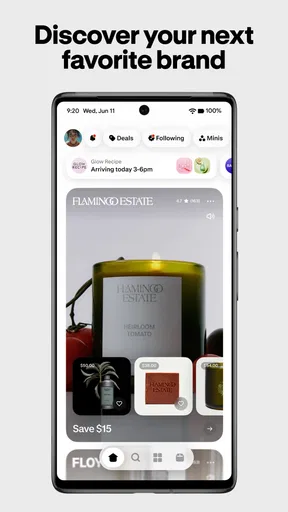
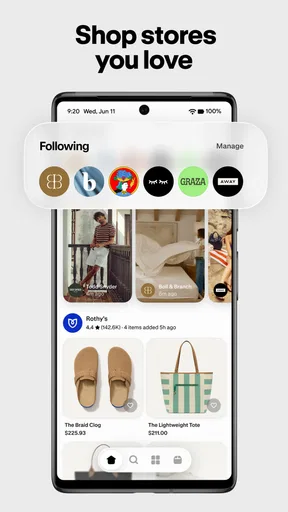
First off, let’s talk usability. The user interface is as smooth as butter, which is a big win in my book. You can easily browse through thousands of brands, each offering a variety of products. What caught my attention was how intuitive the navigation is. Whether you’re a seasoned online shopper or a newbie, you’ll find the layout refreshingly straightforward.
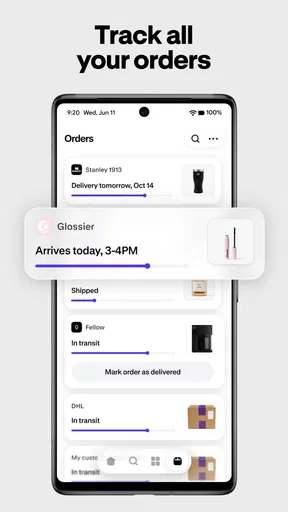
One of the standout features for me is the ability to track all your orders in one place. Gone are the days of sifting through endless emails to find shipping updates. With this app, you get real-time notifications directly to your phone. This feature alone has saved me countless hours and made the app worth its digital weight in gold.
When the app may not be the cause
Not every mismatch between an order and what you see on your screen means the app itself has failed. A retailer may be processing a purchase separately, an order may have been made under another account, or the store may be the only place with the detail needed to answer a delivery question. I use the retailer’s own confirmation as the reference point for those cases, rather than relying on one app to explain every part of a transaction.
Notifications are useful when they arrive at the right moment, but I would not use them as the only record of a purchase. Keep the retailer’s confirmation until the order is complete, particularly for a costly item or a gift with a deadline. If a notification does not arrive, open the app and check the order itself before concluding that nothing has changed. For important delivery plans, the seller’s tracking information is the safer source to consult.
Discover and Save with Ease
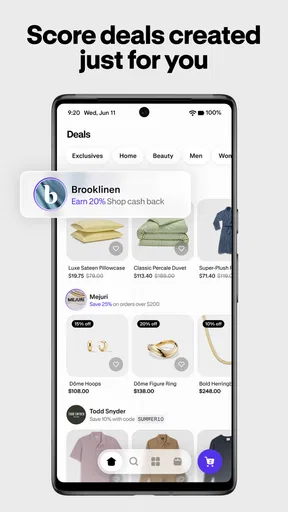
The app's discovery section is like having a personal shopper at your fingertips. I found myself quickly addicted to scrolling through curated collections and personalized recommendations. The app uses smart algorithms to suggest products based on your browsing and buying habits, which is both impressive and a little bit magic. Plus, exclusive deals and offers pop up regularly, so there’s always a bargain waiting to be snapped up.
My practical tip is to browse with a purpose. If I am shopping for a particular need, I use recommendations as a way to notice options I might have missed, not as proof that a product is suitable. I compare the details and total cost before deciding. This keeps discovery enjoyable without letting a stream of appealing suggestions blur the difference between “interesting” and “worth buying.”
And let’s not forget the wishlist feature. It’s perfect for those items you’re not quite ready to splurge on but want to keep an eye on. The app will notify you if there’s a price drop or a flash sale, making it easier to snag your coveted items at the best price.
I find a saved list most useful when I treat it as a shortlist, not a promise to purchase. For example, if I am comparing a few possible gifts during the week, saving the contenders gives me a place to return to when I have time to check their details. I would still verify that an item is available and that the displayed price and terms suit me before acting on a sale alert. A notification can be a helpful prompt, but it should not replace that last check.
Choosing the right shopping route
Compared with shopping directly in each retailer’s app or website, Shop’s appeal is having a broader place to browse and a more consolidated view of purchases. That is handy when I am exploring several brands or trying to keep online orders from getting lost among everyday email. The trade-off is that a retailer’s own channel may be clearer when I need its full product information, a specific account service, or direct help with an order.
Compared with a general marketplace, this app’s value is less about treating every seller as one uniform store and more about connecting discovery and shopping across brands. That distinction matters: I would not assume that delivery, returns, or customer support follow one shared rule just because I found an item through the same app. I check the terms attached to the actual product and seller, then choose the route that gives me the clarity I need.
Seamless Payment and Security
If you’re worried about payment security, rest easy. The app supports a variety of payment methods, including major credit cards and digital wallets. I appreciated the added layer of security with two-factor authentication. It’s clear that user safety is a top priority, and in today’s digital age, that’s incredibly reassuring.
For a smoother checkout, I would review the order summary carefully before confirming, especially when switching between stores or buying from a saved list. Check that the product, destination, and total match what you intended. If a payment step behaves unexpectedly, avoid tapping through repeatedly; first check whether the order has already been placed and consult the retailer’s confirmation or account page. That is more reliable than guessing from a delayed screen.
Another nifty feature is the ability to save multiple shipping addresses. So, whether you’re sending a gift to a friend or shipping something to your office, it’s all set up to be hassle-free. I’ve used this feature more times than I can count, especially during the holiday season when I’m sending gifts to family and friends.
Multiple addresses are genuinely convenient, but they make a final destination check important. For a birthday present sent to a friend, I would pause at checkout and verify the selected address rather than assuming the last-used one is correct. The same habit helps when shopping for home and work in the same week. It is a small step that can prevent a parcel from going to the wrong place.
Who will get the most from it
I think Shop is best for someone who browses across brands, makes online purchases regularly, and values having a central place to revisit orders and saved products. A realistic use is planning a household purchase over several evenings: I can explore options when I have a spare moment, save the ones worth comparing, and return later to check the details before buying. That workflow is less useful if you only shop once in a while or already prefer handling every step on one retailer’s site.
It may also suit a deal-conscious shopper, provided “deal” does not mean buying something solely because an offer appeared. Shop Cash and promotions can add interest, but the sound approach is to compare the final amount and purchase terms with the alternatives. If you want strict control over spending, decide on your budget before opening the discovery feed and use saved items to delay a decision rather than encourage one.
Someone who needs hands-on help with a complicated order may be better served by contacting the retailer directly. Likewise, if you care most about a specialist store’s detailed product tools or account services, its own app or website is likely the clearer choice. Shop is most convincing as a companion to those channels, not a reason to stop checking the source of the purchase.
A practical verdict
In conclusion, the Shop: All your favorite brands app is like having a mall in your pocket, minus the crowds and parking woes. Its combination of ease-of-use, comprehensive brand offerings, and excellent customer service makes it a standout in the crowded field of shopping apps. Whether you’re a casual shopper or a dedicated deal hunter, this app is a game-changer. So, if you haven’t already, give it a whirl. Happy shopping!
My recommendation is a little more measured: I would try it if I want a convenient place to discover products and keep shopping activity organized, while remembering that retailers remain important for order-specific answers. The most useful habit is to keep confirmations, verify the destination and total at checkout, and treat offers as a reason to compare rather than rush. With those checks, Shop can make browsing feel more manageable; without them, no central shopping app can replace careful buying.
Pros
- Sleek and intuitive user interface.
- Wide range of brands and products.
- Personalized shopping recommendations.
- Secure payment options.
- Fast customer support responses.
Cons
- Occasional app crashes reported.
- Limited international shipping options.
- Some features require constant updates.
- Ads can be intrusive at times.
- Notification settings lack customization.
FAQs for Shop
What features does the Shop app offer?
The Shop app is designed to streamline your shopping experience by aggregating all your favorite brands in one place. It offers features like tracking your orders in real-time, discovering new products through personalized recommendations, and simplifying the checkout process with secure payment options. The app also provides exclusive deals and promotions.
Is the Shop app free to use?
Yes, the Shop app is free to download and use. While there are no subscription fees, keep in mind that purchases made through the app will incur costs based on the items you buy. Some features, like premium shipping options or exclusive deals, might also involve additional charges.
How secure is my personal information on the Shop app?
The Shop app takes user privacy seriously by implementing robust security measures. It uses encryption to protect your personal and payment information. Additionally, the app requires user authentication to prevent unauthorized access. Always ensure you have the latest version for enhanced security features.
Can I track my orders through the Shop app?
Absolutely, one of the key features of the Shop app is its order tracking capability. Once you make a purchase, you can monitor your package's journey from shipment to delivery in real-time. You’ll receive notifications about your order status, ensuring you're always updated.
Which platforms support the Shop app?
The Shop app is available on both Android and iOS platforms. You can download it from the Google Play Store for Android devices or the Apple App Store for iOS devices. Ensure your device has the latest operating system for optimal performance and access to all features.


